17 Ocak 2019 Perşembe
Regedit İşlemi
Const HKEY_CLASSES_ROOT = &H80000000
Const HKEY_CURRENT_USER = &H80000001
Const HKEY_LOCAL_MACHINE = &H80000002
Const HKEY_USERS = &H80000003
strComputer = "."
strKeyPath = "Software\Test"
Set objRegistry = GetObject("winmgmts:\\" & strComputer & "\root\default:StdRegProv")
DelSubkeysHKCU HKEY_CURRENT_USER, "Software\Bentley\Licensing\1.1\"
DelSubkeysHKLM HKEY_LOCAL_MACHINE, "Software\Wow6432Node\Bentley\Licensing\1.1\"
Sub DelSubkeysHKLM(HKEY_LOCAL_MACHINE, strKey)
objRegistry.EnumKey HKEY_LOCAL_MACHINE, strKey, arrSubKeys
If IsArray(arrSubKeys) Then
For Each strSubkey In arrSubKeys
DelSubkeysHKLM HKEY_LOCAL_MACHINE, strKey & "\" & strSubkey
Next
End If
objRegistry.DeleteKey HKEY_LOCAL_MACHINE, strKey
End Sub
Sub DelSubkeysHKCU(HKEY_CURRENT_USER, strKey)
objRegistry.EnumKey HKEY_CURRENT_USER, strKey, arrSubKeys
If IsArray(arrSubKeys) Then
For Each strSubkey In arrSubKeys
DelSubkeysHKCU HKEY_CURRENT_USER, strKey & "\" & strSubkey
Next
End If
objRegistry.DeleteKey HKEY_CURRENT_USER, strKey
End Sub

Gizli Dosyaların Gösterilmesi
gdosyalar.reg diye dosya oluşturulup içine alttaki bilgiler yazılacak
Windows Registry Editor Version 5.00
[-HKEY_LOCAL_MACHINE\SOFTWARE\Microsoft\Windows\Curr entVersion\Explorer\Advanced\Folder\Hidden]
[HKEY_LOCAL_MACHINE\SOFTWARE\Microsoft\Windows\Curr entVersion\Explorer\Advanced\Folder\Hidden]
"Text"="@shell32.dll,-30499"
"Type"="group"
"Bitmap"=hex(2):25,00,53,00,79,00,73,00,74,00,65,0 0,6d,00,52,00,6f,00,6f,00,74,\
00,25,00,5c,00,73,00,79,00,73,00,74,00,65,00,6d,00 ,33,00,32,00,5c,00,53,00,\
48,00,45,00,4c,00,4c,00,33,00,32,00,2e,00,64,00,6c ,00,6c,00,2c,00,34,00,00,\
00
"HelpID"="shell.hlp#51131"
[HKEY_LOCAL_MACHINE\SOFTWARE\Microsoft\Windows\Curr entVersion\Explorer\Advanced\Folder\Hidden\NOHIDDE N]
"RegPath"="Software\\Microsoft\\Windows\\CurrentVe rsion\\Explorer\\Advanced"
"Text"="@shell32.dll,-30501"
"Type"="radio"
"CheckedValue"=dword:00000002
"ValueName"="Hidden"
"DefaultValue"=dword:00000002
"HKeyRoot"=dword:80000001
"HelpID"="shell.hlp#51104"
[HKEY_LOCAL_MACHINE\SOFTWARE\Microsoft\Windows\Curr entVersion\Explorer\Advanced\Folder\Hidden\SHOWALL]
"RegPath"="Software\\Microsoft\\Windows\\CurrentVe rsion\\Explorer\\Advanced"
"Text"="@shell32.dll,-30500"
"Type"="radio"
"CheckedValue"=dword:00000001
"ValueName"="Hidden"
"DefaultValue"=dword:00000002
"HKeyRoot"=dword:80000001
"HelpID"="shell.hlp#51105"
[HKEY_CURRENT_USER\Software\microsoft\Windows\Curre ntVersion\Explorer\Advanced]
"Hidden"=dword:00000001
Klasör Seçenekleri Menüsü
Başlat /Çalıştır a Gpedit.msc yaz
Grup ilkesi penceresi açılacak
Kullanıcı yapılandırması /
Yönetim şablonları /
Windows bileşenleri /
Windows gezgini kısmına tıkladığında sağ taraftaki listede
"Klasör seçenekleri öğesini araçlar menüsünden kaldır" diye bi ayar var. ona sağ tıklayıp özelliklerden devre sışı yaparsan Klasör seçenekleri menüsü geri gelecektir.
Grup ilkesi penceresi açılacak
Kullanıcı yapılandırması /
Yönetim şablonları /
Windows bileşenleri /
Windows gezgini kısmına tıkladığında sağ taraftaki listede
"Klasör seçenekleri öğesini araçlar menüsünden kaldır" diye bi ayar var. ona sağ tıklayıp özelliklerden devre sışı yaparsan Klasör seçenekleri menüsü geri gelecektir.
3 Ekim 2017 Salı
Excelden Outlook toplantı verilerini Aktarma
Sub Outlook_Takvime_Gonder()
Dim EvnOUT As Object, OutRandevu As Object, say As Long
say = 0
For s = 3 To Range("C65536").End(xlUp).Row
If Cells(s, "B") <> "OK" Then
On Error Resume Next
Set EvnOUT = GetObject(, "Outlook.Application")
If Err.Number = 429 Then
Set EvnOUT = CreateObject("Outlook.application")
End If
On Error GoTo 0
Set OutRandevu = EvnOUT.CreateItem(1)
On Error Resume Next
With OutRandevu
.Start = Cells(s, "C") + Cells(s, "D")
.End = Cells(s, 5) + Cells(s, 6)
.Subject = Cells(s, 7)
.Location = Cells(s, 8)
.Body = Cells(s, "I")
If Len(Cells(s, "J")) > 0 Then
If IsNumeric(Cells(s, "J")) Then
.ReminderMinutesBeforeStart = Cells(s, "J")
.ReminderSet = True
End If
End If
If Err <> 0 Then
Cells(s, "B") = "HATA"
Else
.Save
Cells(s, "B") = "OK"
Err = 0
say = say + 1
End If
End With
Set EvnOUT = Nothing
Set OutRandevu = Nothing
End If
Next s
If say > 0 Then
MsgBox say & " adet kayıt aktarıldı.", vbInformation
Else
MsgBox "Aktarılan kayıt yok!", vbExclamation
End If
End Sub
Örnek excel_dosyası indir
25 Ocak 2017 Çarşamba
Microstation VBA Element ekleme
Sub YaziYaz()
Dim ele As Element
Dim nokta As Point3d
nokta.x = 0
nokta.y = 0
Set ele = besuYazi("Deneme", "sil", nokta, 0, 3, 2, 2, 8, True)
Set ele = besuNokta(nokta, "nokta", 3, 1, True)
End Sub
Function besuYazi(yazi As String, lev As String, origin As Point3d, aci As Double, renk As Integer, yuk As Double, gen As Double, jst As Integer, ekle As Boolean) As Element
Dim tAci As Matrix3d
tAci = Matrix3dFromAxisAndRotationAngle(2, aci)
Dim j As Integer
Set besuYazi = CreateTextElement1(Nothing, yazi, origin, tAci)
besuYazi.level = besuLevel(lev)
besuYazi.AsTextElement.TextStyle.Height = yuk
besuYazi.AsTextElement.TextStyle.Width = gen
besuYazi.Color = renk
besuYazi.LineStyle = ByLevelLineStyle
besuYazi.LineWeight = ByLevelLineWeight
Set oFont = ActiveDesignFile.Fonts.Find(msdFontTypeWindowsTrueType, "Arial")
Set besuYazi.AsTextElement.TextStyle.Font = oFont
' oNewElement.Color = 5
besuYazi.AsTextElement.TextStyle.Justification = jst
If ekle Then
ActiveModelReference.AddElement besuYazi
End If
besuYazi.Redraw
End Function
Function besuLevel(levname As String) As level
Set besuLevel = ActiveDesignFile.Levels.Find(levname)
If besuLevel Is Nothing Then
CadInputQueue.SendKeyin "level create " & Chr(34) & levname & Chr(34)
Set besuLevel = ActiveDesignFile.Levels.Find(levname)
End If
End Function
Dim ele As Element
Dim nokta As Point3d
nokta.x = 0
nokta.y = 0
Set ele = besuYazi("Deneme", "sil", nokta, 0, 3, 2, 2, 8, True)
Set ele = besuNokta(nokta, "nokta", 3, 1, True)
End Sub
Function besuYazi(yazi As String, lev As String, origin As Point3d, aci As Double, renk As Integer, yuk As Double, gen As Double, jst As Integer, ekle As Boolean) As Element
Dim tAci As Matrix3d
tAci = Matrix3dFromAxisAndRotationAngle(2, aci)
Dim j As Integer
Set besuYazi = CreateTextElement1(Nothing, yazi, origin, tAci)
besuYazi.level = besuLevel(lev)
besuYazi.AsTextElement.TextStyle.Height = yuk
besuYazi.AsTextElement.TextStyle.Width = gen
besuYazi.Color = renk
besuYazi.LineStyle = ByLevelLineStyle
besuYazi.LineWeight = ByLevelLineWeight
Set oFont = ActiveDesignFile.Fonts.Find(msdFontTypeWindowsTrueType, "Arial")
Set besuYazi.AsTextElement.TextStyle.Font = oFont
' oNewElement.Color = 5
besuYazi.AsTextElement.TextStyle.Justification = jst
If ekle Then
ActiveModelReference.AddElement besuYazi
End If
besuYazi.Redraw
End Function
Function besuNokta(origin As Point3d, lev As String, renk As Integer, kln As Integer, ekle As Boolean) As Element
Set besuNokta = CreateLineElement2(Nothing, origin, origin)
besuNokta.level = besuLevel(lev)
besuNokta.Color = renk
besuNokta.LineWeight = kln
If ekle Then
ActiveModelReference.AddElement besuNokta
End If
besuNokta.Redraw
End Function
Function besuLevel(levname As String) As level
Set besuLevel = ActiveDesignFile.Levels.Find(levname)
If besuLevel Is Nothing Then
CadInputQueue.SendKeyin "level create " & Chr(34) & levname & Chr(34)
Set besuLevel = ActiveDesignFile.Levels.Find(levname)
End If
End Function
10 Ocak 2017 Salı
Microstation Vba Form ile Data Blok kullanımı verilerin Excele yazdırılması
FormDBlock kodları
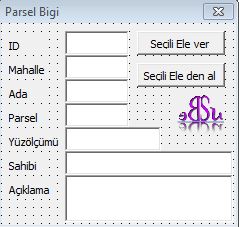
Dim parsel As DBParsel
Private Sub CAl_Click()
Call BilgiOku
End Sub
Private Sub CVer_Click()
Call BilgiEkle
End Sub
Private Sub UserForm_Initialize()
Call BilgiOku
End Sub
Function ParselBilgi(dblk As DataBlock, parsel As DBParsel, copyToDataBlock As Boolean)
dblk.CopyLong parsel.id, copyToDataBlock
dblk.CopyString parsel.Mah, copyToDataBlock
dblk.CopyLong parsel.Ada, copyToDataBlock
dblk.CopyLong parsel.parsel, copyToDataBlock
dblk.CopyDouble parsel.Yuzolcumu, copyToDataBlock
dblk.CopyString parsel.Sahibi, copyToDataBlock
dblk.CopyString parsel.Aciklama, copyToDataBlock
End Function
Function BilgiEkle()
Dim ele As Element
Dim dblk As New DataBlock
Dim dblke() As DataBlock
If seciliElement(ele) Then
parsel.id = Val(TId.Text)
parsel.Mah = TMah.Text
parsel.Ada = Val(TAda.Text)
parsel.parsel = Val(TParsel.Text)
parsel.Yuzolcumu = Val(TYuzolcumu)
parsel.Sahibi = TSahibi
parsel.Aciklama = TAciklama
dblke = ele.GetUserAttributeData(parselId)
ReDim Preserve dblke(0)
If Not dblke(0) Is Nothing Then
ele.DeleteUserAttributeData parselId, 0
ele.Rewrite
End If
Call ParselBilgi(dblk, parsel, True)
ele.AddUserAttributeData parselId, dblk
ele.Rewrite
End If
End Function
Function BilgiOku()
Dim ele As Element
Dim dblke() As DataBlock
Dim parsel As DBParsel
Dim value As Long, name As String
If seciliElement(ele) Then
dblke = ele.GetUserAttributeData(parselId)
ReDim Preserve dblke(0)
If Not dblke(0) Is Nothing Then
ParselBilgi dblke(0), parsel, False
TId.Text = Str(parsel.id)
TMah.Text = parsel.Mah
TAda.Text = Str(parsel.Ada)
TParsel.Text = Str(parsel.parsel)
TYuzolcumu = parsel.Yuzolcumu
TSahibi = parsel.Sahibi
TAciklama = parsel.Aciklama
End If
End If
End Function
Function seciliElement(ByRef sElement As Element) As Boolean
Dim oScanEnumerator As ElementEnumerator
If ActiveModelReference.AnyElementsSelected Then
Set oScanEnumerator = ActiveModelReference.GetSelectedElements
oScanEnumerator.MoveNext
Set sElement = oScanEnumerator.Current
seciliElement = True
Else
seciliElement = False
MsgBox ("Secili Element yok")
End If
End Function
Public Function IsGroupedHole(ByVal oElement As Element) As Boolean
Public Function HoleArea(ByVal oGroupedHole As CellElement) As Double
If (IsGroupedHole(oGroupedHole)) Then
Do While oEnumerator.MoveNext
If (0# < area) Then
Exit Function
err_ComputeGroupedHoleArea:
Function GetOrigin(ele As Element) As Point3d
End Function
Sub ElementScanComplex(oElement As ComplexElement)
Set oEnumerator = oElement.GetSubElements
Do While oEnumerator.MoveNext
Function ParselBilgiYaz(ele As Element, parsel As DBParsel)
Private Sub CExcele_Click()
oSheet.Cells(Counter, 15) = "ID"
oSheet.Cells(1, 36).FormulaR1C1 = "=COUNT(C[-31],1)"
Counter = Counter + 1
CExcelden butonuna kod ekleyelim

Dim parsel As DBParsel
Private Sub CAl_Click()
Call BilgiOku
End Sub
Private Sub CVer_Click()
Call BilgiEkle
End Sub
Private Sub UserForm_Initialize()
Call BilgiOku
End Sub
Function ParselBilgi(dblk As DataBlock, parsel As DBParsel, copyToDataBlock As Boolean)
dblk.CopyLong parsel.id, copyToDataBlock
dblk.CopyString parsel.Mah, copyToDataBlock
dblk.CopyLong parsel.Ada, copyToDataBlock
dblk.CopyLong parsel.parsel, copyToDataBlock
dblk.CopyDouble parsel.Yuzolcumu, copyToDataBlock
dblk.CopyString parsel.Sahibi, copyToDataBlock
dblk.CopyString parsel.Aciklama, copyToDataBlock
End Function
Function BilgiEkle()
Dim ele As Element
Dim dblk As New DataBlock
Dim dblke() As DataBlock
If seciliElement(ele) Then
parsel.id = Val(TId.Text)
parsel.Mah = TMah.Text
parsel.Ada = Val(TAda.Text)
parsel.parsel = Val(TParsel.Text)
parsel.Yuzolcumu = Val(TYuzolcumu)
parsel.Sahibi = TSahibi
parsel.Aciklama = TAciklama
dblke = ele.GetUserAttributeData(parselId)
ReDim Preserve dblke(0)
If Not dblke(0) Is Nothing Then
ele.DeleteUserAttributeData parselId, 0
ele.Rewrite
End If
Call ParselBilgi(dblk, parsel, True)
ele.AddUserAttributeData parselId, dblk
ele.Rewrite
End If
End Function
Function BilgiOku()
Dim ele As Element
Dim dblke() As DataBlock
Dim parsel As DBParsel
Dim value As Long, name As String
If seciliElement(ele) Then
dblke = ele.GetUserAttributeData(parselId)
ReDim Preserve dblke(0)
If Not dblke(0) Is Nothing Then
ParselBilgi dblke(0), parsel, False
TId.Text = Str(parsel.id)
TMah.Text = parsel.Mah
TAda.Text = Str(parsel.Ada)
TParsel.Text = Str(parsel.parsel)
TYuzolcumu = parsel.Yuzolcumu
TSahibi = parsel.Sahibi
TAciklama = parsel.Aciklama
End If
End If
End Function
Function seciliElement(ByRef sElement As Element) As Boolean
Dim oScanEnumerator As ElementEnumerator
If ActiveModelReference.AnyElementsSelected Then
Set oScanEnumerator = ActiveModelReference.GetSelectedElements
oScanEnumerator.MoveNext
Set sElement = oScanEnumerator.Current
seciliElement = True
Else
seciliElement = False
MsgBox ("Secili Element yok")
End If
End Function
Modul DBlock kodları
Public Type DBParsel
id As Long
Mah As String
Ada As Long
parsel As Long
Yuzolcumu As Double
Sahibi As String
Aciklama As String
End Type
Public Const parselId As Long = 1453
Sub ParselBilgisi()
FormDBlock.Show
End Sub
Parsellerin kapalı alan olması gerekmektedir.
Bilgi verdiğimiz parselleri seçerek excele yazdıralım.
Excelin açık olamsı lazım. Aktif Excel sayfasına veriler yazılacaktır.
Formumuza 2 tane buton ekleyelim
CExcele ve CExcelden isimleri verelim
Projeye Fonksiyonlar diye bir modül ekleyelim. İçine alttaki fonksiyonları yazalım
Declare Function mdlElmdscr_isGroupedHole Lib "stdmdlbltin.dll" (ByVal groupEdP As Long) As Long
Public Function IsGroupedHole(ByVal oElement As Element) As Boolean
IsGroupedHole = 0 <> mdlElmdscr_isGroupedHole(oElement.MdlElementDescrP)
End Function
Public Function HoleArea(ByVal oGroupedHole As CellElement) As Double
HoleArea = 0#
On Error GoTo err_ComputeGroupedHoleArea
If (IsGroupedHole(oGroupedHole)) Then
Dim area As Double
Dim oEnumerator As ElementEnumerator
Set oEnumerator = oGroupedHole.GetSubElements
' Get enclosing element
oEnumerator.MoveNext
If (oEnumerator.Current.IsClosedElement) Then
area = oEnumerator.Current.AsClosedElement.area
End If
Do While oEnumerator.MoveNext
' Get each hole element
If (oEnumerator.Current.IsClosedElement) Then
area = area - oEnumerator.Current.AsClosedElement.area
End If
Loop
If (0# < area) Then
HoleArea = area
End If
End If
Exit Function
err_ComputeGroupedHoleArea:
MsgBox "Error no. " & CStr(Err.Number) & ": " & Err.Description, vbOKOnly Or vbCritical, "Error in ComputeGroupedHoleArea"
End Function
Function GetOrigin(ele As Element) As Point3d
If ele.IsClosedElement Then GetOrigin = ele.AsClosedElement.Centroid
If ele.IsCellElement Then GetOrigin = ele.AsCellElement.Origin
' If ele.IsApplicationElement Then GetOrigin = ele.AsApplicationElement.Range
End Function
Sub ElementScanComplex(oElement As ComplexElement)
Dim oEnumerator As ElementEnumerator
Dim oSubElement As Element
Set oEnumerator = oElement.GetSubElements
Do While oEnumerator.MoveNext
Set oSubElement = oEnumerator.Current
If oSubElement.IsTextElement = True Then
TextGetAttributes oSubElement
Else
ShowError "Sub unit found is not a text element!"
Exit Sub
End If
If oSubElement.IsComplexElement Then
ElementScanComplex oSubElement
End If
Loop
End Sub
Function besuLevel(levname As String) As Level
Set besuLevel = ActiveDesignFile.Levels.Find(levname)
If besuLevel Is Nothing Then
CadInputQueue.SendKeyin "level create " & Chr(34) & levname & Chr(34)
Set besuLevel = ActiveDesignFile.Levels.Find(levname)
End If
End Function
formun kod alananına 2 fonksiyon ilave edelim
Function ParselBilgiOku(ele As Element) As DBParsel
Dim dblke() As DataBlock
dblke = ele.GetUserAttributeData(parselId)
ReDim Preserve dblke(0)
If Not dblke(0) Is Nothing Then
ParselBilgi dblke(0), ParselBilgiOku, False
End If
End Function
Function ParselBilgiYaz(ele As Element, parsel As DBParsel)
Dim dblk As New DataBlock
Dim dblke() As DataBlock
dblke = ele.GetUserAttributeData(parselId)
ReDim Preserve dblke(0)
If Not dblke(0) Is Nothing Then
ele.DeleteUserAttributeData parselId, 0
ele.Rewrite
End If
Call ParselBilgi(dblk, parsel, True)
ele.AddUserAttributeData parselId, dblk
ele.Rewrite
End Function
CExcele butonuna kod ekleyelelim
Private Sub CExcele_Click()
Dim Counter As Long
Dim oScanCriteria As ElementScanCriteria
Dim oScanEnumerator As ElementEnumerator
Dim oElement As Element
Dim satir As Integer
Dim Elementno As Long
Dim sElement As Element
Dim cElement As Element
Dim vw As View
Dim ci As CursorInformation
Dim yazien As Double, yaziboy As Double
Dim chElement As CellElement
Dim ec As ElementCache
Dim alan As Double
Dim parsel As DBParsel
Dim oDE As DroppableElement
Dim oEE As ElementEnumerator
Set oXL = GetObject(, "Excel.Application")
Set oSheet = oXL.activeWorkbook.activesheet
Counter = 1
oSheet.Cells(Counter, 1).value = "Sıra"
oSheet.Cells(Counter, 2) = "Level"
oSheet.Cells(Counter, 3) = "Renk Çizgi"
oSheet.Cells(Counter, 4) = "Renk Dolgu" '-1 boş
oSheet.Cells(Counter, 5) = "origin.x"
oSheet.Cells(Counter, 6) = "origin.y"
oSheet.Cells(Counter, 7) = "Transparency"
oSheet.Cells(Counter, 8) = "Priority"
oSheet.Cells(Counter, 9) = "ID.Low"
oSheet.Cells(Counter, 10) = "ID.High"
oSheet.Cells(Counter, 11) = "Hesap Alanı"
oSheet.Cells(Counter, 15) = "ID"
oSheet.Cells(Counter, 16) = "Mahalle"
oSheet.Cells(Counter, 17) = "Ada"
oSheet.Cells(Counter, 18) = "Parsel"
oSheet.Cells(Counter, 19) = "Yüzölçümü"
oSheet.Cells(Counter, 20) = "Sahibi"
oSheet.Cells(Counter, 21) = "Açıklama"
oSheet.Cells(1, 36).FormulaR1C1 = "=COUNT(C[-31],1)"
Counter = oSheet.Cells(1, 36) + 1
Set oScanEnumerator = ActiveModelReference.GetSelectedElements
Dim shapeel As Element
Do While oScanEnumerator.MoveNext
Set oElement = oScanEnumerator.Current
'If oElement.IsShapeElement Or oElement.IsComplexShapeElement Then
With oElement
If IsGroupedHole(oElement) Or oElement.IsClosedElement Then
If IsGroupedHole(oElement) Then
alan = HoleArea(oElement.AsCellElement)
Set oDE = oElement
Set oEE = oDE.Drop
Set chElement = oElement
Do While oEE.MoveNext
With oEE.Current
If .IsClosedElement Then
If Not .AsClosedElement.IsHole Then
oSheet.Cells(Counter, 2) = .Level.name
Origin = GetOrigin(oEE.Current)
oSheet.Cells(Counter, 3) = .Color
oSheet.Cells(Counter, 4) = .AsClosedElement.FillColor
oSheet.Cells(Counter, 11) = alan
End If
End If
End With
Loop
End If
If .IsClosedElement Then
oSheet.Cells(Counter, 2) = oElement.Level.name
Origin = GetOrigin(oElement)
oSheet.Cells(Counter, 3) = .Color
oSheet.Cells(Counter, 4) = .AsClosedElement.FillColor
oSheet.Cells(Counter, 11) = Format(.AsClosedElement.area, "0.0000")
End If
parsel = ParselBilgiOku(oElement)
oSheet.Cells(Counter, 5) = Format(Origin.X, "0.00")
oSheet.Cells(Counter, 6) = Format(Origin.Y, "0.00")
oSheet.Cells(Counter, 7) = .Transparency
oSheet.Cells(Counter, 8) = .DisplayPriority
oSheet.Cells(Counter, 9) = .id.Low
oSheet.Cells(Counter, 10) = .id.High
oSheet.Cells(Counter, 15) = parsel.id
oSheet.Cells(Counter, 16) = parsel.mah
oSheet.Cells(Counter, 17) = parsel.Ada
oSheet.Cells(Counter, 18) = parsel.parsel
oSheet.Cells(Counter, 19) = parsel.Yuzolcumu
oSheet.Cells(Counter, 20) = parsel.Sahibi
oSheet.Cells(Counter, 21) = parsel.Aciklama
Counter = Counter + 1
oSheet.Cells(Counter, 1).Select
End If
End With
Loop
GoTo gec
hatavar:
Resume Next
gec:
End Sub
CExcelden butonuna kod ekleyelim
Private Sub CExcelden_Click()
Dim id As DLong
Dim i As Integer, lvlCount As Long
Dim elem As Element
Dim satir As Integer
Dim lev As Level
Dim satsay As Integer
Dim URLTextTitle, URLText As String
Dim ggroup As Long
Dim parsel As DBParsel
Counter = 0
Set oXL = GetObject(, "Excel.Application")
Set oSheet = oXL.activeWorkbook.activesheet
Counter = 2
Do While oSheet.Cells(Counter, 2) <> ""
oSheet.Cells(Counter, 2).Select
id.Low = oSheet.Cells(Counter, 9)
id.High = oSheet.Cells(Counter, 10)
Set elem = ActiveModelReference.GetElementByID(id)
elem.Level = besuLevel(oSheet.Cells(Counter, 2))
If elem.IsClosedElement Then
elem.AsClosedElement.FillMode = msdFillModeOutlined
elem.Color = oSheet.Cells(Counter, 3)
elem.AsClosedElement.FillColor = oSheet.Cells(Counter, 4)
If oSheet.Cells(Counter, 4) < 0 Then
elem.AsClosedElement.FillColor = 0
elem.AsClosedElement.FillMode = msdFillModeNotFilled
End If
End If
elem.Transparency = oSheet.Cells(Counter, 7) / 100
elem.DisplayPriority = oSheet.Cells(Counter, 8)
parsel.id = oSheet.Cells(Counter, 15)
parsel.mah = oSheet.Cells(Counter, 16)
parsel.Ada = oSheet.Cells(Counter, 17)
parsel.parsel = oSheet.Cells(Counter, 18)
parsel.Yuzolcumu = oSheet.Cells(Counter, 19)
parsel.Sahibi = oSheet.Cells(Counter, 20)
parsel.Aciklama = oSheet.Cells(Counter, 21)
Call ParselBilgiYaz(elem, parsel)
elem.Rewrite
Counter = Counter + 1
Loop
End Sub

Yeşil sütunlar excelde değiştirilip geüncelleme yapılabilir.
9 Ocak 2017 Pazartesi
Microstation VBA DataBlock örneği
Private Const parselMulkiyetId As Long = 1453
Private Type DBParsel
id As Long
Mah As String
Ada As Long
parsel As Long
Yuzolcumu As Double
Sahibi As String
Aciklama As String
End Type
' AddLinkage and GetLinkage both transfer the data using TransferBlock.
' That way, it is easy to be certain that the transfer always occur in the
' same order.
Private Sub ParselBilgi(dblk As DataBlock, parsel As DBParsel, copyToDataBlock As Boolean)
dblk.CopyLong parsel.id, copyToDataBlock
dblk.CopyString parsel.Mah, copyToDataBlock
dblk.CopyLong parsel.Ada, copyToDataBlock
dblk.CopyLong parsel.parsel, copyToDataBlock
dblk.CopyDouble parsel.Yuzolcumu, copyToDataBlock
dblk.CopyString parsel.Sahibi, copyToDataBlock
dblk.CopyString parsel.Aciklama, copyToDataBlock
End Sub
Sub BilgiEkle()
Dim ele As element
Dim dblk As New DataBlock
Dim parsel As DBParsel
If seciliElement(ele) Then
parsel.id = 1
parsel.Mah = "Balmumcu"
parsel.Ada = 2500
parsel.parsel = 1
parsel.Yuzolcumu = 1000.58
parsel.Sahibi = "Yıldız"
parsel.Aciklama = "Parsel Açıklaması"
Call ParselBilgi(dblk, parsel, True)
ele.AddUserAttributeData parselMulkiyetId, dblk
ele.Rewrite
End If
End Sub
Sub BilgiOku()
Dim ele As element
Dim dblk() As DataBlock
Dim parsel As DBParsel
Dim value As Long, name As String
If seciliElement(ele) Then
dblk = ele.GetUserAttributeData(parselMulkiyetId)
ParselBilgi dblk(0), parsel, False
MsgBox "parsel bilgi" & Chr(10) _
& "ID=" & parsel.id & Chr(10) _
& "Mahalle=" & parsel.Mah & Chr(10) _
& "Ada=" & parsel.Ada & Chr(10) _
& "Parsel=" & parsel.parsel & Chr(10) _
& "Sahibi=" & parsel.Sahibi & Chr(10) _
& "Yüzölçümü=" & parsel.Yuzolcumu & Chr(10) _
& "Açıklama=" & parsel.Aciklama & Chr(10)
End If
End Sub
Function seciliElement(ByRef sElement As element) As Boolean
Dim oScanEnumerator As ElementEnumerator
If ActiveModelReference.AnyElementsSelected Then
Set oScanEnumerator = ActiveModelReference.GetSelectedElements
oScanEnumerator.MoveNext
Set sElement = oScanEnumerator.Current
seciliElement = True
Else
seciliElement = False
MsgBox ("Secili Element yok")
End If
End Function
4 Ocak 2017 Çarşamba
Microstation Vba Cizim Alanı Çerçevesi ekleme

Çizim alacağınız alana çerçeve çizdirin.
Yazdıracağınız kağıt boyutunu listeden seçebilir veya özel ayarlardan kağıt boyutunu kendiniz verebilirsiniz.
Cizim Alanı olarak bir dikdörtgen çizecektir.
Ölçek işaretli olursa Sağ alt kısma Ölçek yazdırılır.
Çizilen dikdörtgen Fence olarak işaretlenecektir. Direkt yazıcıya gönderebilirsiniz.
Microstation Vba Cephe yazdırma
Line, Linestring ve shape elementlerine cephe yazdırabilirsiniz.
cephe formatı { } parantezleri arasına yazılacak
parantezlerin önünde ve sonunda yazdırmak istediğiniz ekleri yazdırabilirsiniz.

Key-in komutu
vba run cepheyaz_pr2.Cepheyaz
cephe formatı { } parantezleri arasına yazılacak
parantezlerin önünde ve sonunda yazdırmak istediğiniz ekleri yazdırabilirsiniz.
Key-in komutu
vba run cepheyaz_pr2.Cepheyaz
10 Kasım 2016 Perşembe
Sondaj Noktası Litolojisi
|
|
Penceresini açalım ve silindir adında yeni bir mvba dosyası oluşturalım.
 |

İçine Kodlarımızı yazalım:
Sub Silindir()
Dim pointS As Point3d
Dim pointE As Point3d
Dim cap As Double
Dim oPipe As Element
Dim levname As String
cap = 10
Set oXL = GetObject(, "Excel.Application")
Set oSheet = oXL.activeWorkbook.activesheet
k = 2
Do While oSheet.cells(k, 1) <> ""
pointS.X = 0
pointS.Y = -oSheet.cells(k, 2)
pointS.Z = 0
pointE.X = 0
pointE.Y = -oSheet.cells(k, 3)
pointE.Z = 0
levname = oSheet.cells(k, 4)
Set oPipe = SilindirCiz(pointS, pointE, cap, msdDrawingModeNormal)
oPipe.Level = myLevel(levname)
ActiveModelReference.AddElement oPipe
k = k + 1
Loop
End Sub
Private Function SilindirCiz(ByRef startPoint As Point3d, ByRef endPoint As Point3d, ByVal radius As Double, ByVal drawMode As MsdDrawingMode) As Element
Set SilindirCiz = Nothing
Dim oCone As ConeElement
Set oCone = CreateConeElement1(Nothing, radius, startPoint, radius, endPoint, Matrix3dIdentity)
oCone.Redraw drawMode
Set SilindirCiz = oCone
End Function
Private Function myLevel(levname As String) As Level
Set myLevel = ActiveDesignFile.Levels.Find(levname)
If myLevel Is Nothing Then
CadInputQueue.SendKeyin "level create " & Chr(34) & levname & Chr(34)
Set myLevel = ActiveDesignFile.Levels.Find(levname)
End If
End Function
Bu örnek dahada geliştirilebilir.
Örneğin 5 sütuna renk bilgisi eklenipoPipe.Color = oSheet.cells(k, 5) dediğimizde rengide excelden alınabilir. |  |
Programı çalıştırmak için Key-in komut satırına
vba run Silindir dememiz yeterli. |
Çalışması için çalışma sayfası 3D, Excel dosyasının açık olması ve nokta bilgilerinin sayfası aktif olmalıdır.
silindir.mvba
silindir.mvba
21 Ağustos 2016 Pazar
Excel ile Kurban Satış Takibi

Kurban Satış Takip Programı;
Büyükbaş kurban satışları için kullanılabilecek Excelde oluşturulmuş bir programdır.
Excelde,
Kişiler
Kurbanlıklar
Sayfaları bulunmaktadır. Kurbanlıklar sayfasında kurban bilgileri girilir.
Kişiler sayfasında Hisse Satışı düğmesi ile program calıştırılır.
Programın calışması icin Office - Excelin 32 bit olması gerekir.
Windows 64 olabilir.
32 bit office kurulduğundan emin iseniz MSCOMCTL.OCX dosyası indirilip sisteme register edilmelidir.
MSCOMCTL.OCX dosyası
32 bit Windows ta
c:\windows\system32 ye kopyalanır
calıştır komutuna
regsvr32 c:\windows\system32\mscomctl.ocx
yazılarak register edilir.
64 bit windows ta
c:\windows\syswow64 dizinine kopyalanır
calıştır komutuna veya command (cmd) satırına
regsvr32 c:\windows\syswow64\mscomctl.ocx
yazılarak register edilir.
Acılışta Güvenlik Uyarısı olarak Macrolar devre dışı bırakıldı diyor ise Seceneklerden icerik etkinleştirilir.
Register edilince alttaki uyarı alınacaktır.
 Yardım almak isteyenler telden bana ulaşabilirler. Dosyanın Ana Sayfasında telefon numaram mevcut.
Bilgisayardan destek almak isteyenler alttaki programı (Teamviewer Portable versyonu) indirip (rar) lı dosyayı biryere acıp Teamviewer.exe yi calıştırarak uzak masa üstü yardımı verebilirim.
---------------------------------------------------------------------------------------
Excel dosyasını indirKesim takip flash dosyası drive dan indir
Kesim takip flash dosyası EXE indir
Kesim takip flash dosyası SWF indir
SWF dosyasının çalışması için FlashPlayer indir
---------------------------------------------------------------------------------------
Uzaktan Yardım Programı indir
Kurban Kesiminde canlı yayın18 Temmuz 2016 Pazartesi
Kurban – Ana Sayfa
DKTY KESİM MERKEZİ
2020 yılı
| KNO | DURUM | KESIM SAAT | MASA SAAT | MASA NO | TESLIM SAAT |
|---|
4 Ağustos 2015 Salı
FEST-İ BURSA 2015
Değirmenlikızık Eğitim Kurumları bünyesinde eğitim gören öğrencilere destek amaçlı yapılan 10 gün devam edecek olan Kermes organizasyonu. Açılış : 29 Ağustos 2015 Saat 11:00
Yer: Yıldırım Belediyesi Bayrak Alanı


12 Şubat 2015 Perşembe
Excel VBA Hücreye Açıklama Ekleme
Sub AciklamaEkle()
Dim S1 As Worksheet
Set S1 = Worksheets("Sayfa1")
Call
Aciklama_Ekle (S1.Cells(1, 1), "Açıklama Eklendi")
End Sub
Function Aciklama_Ekle(hucre As Range, note As String)
Dim cmt As Comment
Set cmt = hucre.Comment
If cmt Is Nothing Then
Set cmt = hucre.AddComment
cmt.Text Text:=note
Else
note = note & Chr(10) & cmt.Text
cmt.Text Text:=note
If cmt.Shape.Height < 150 Then cmt.Shape.Height = cmt.Shape.Height + 20
End If
cmt.Visible = False
End Function
Kaydol:
Kayıtlar (Atom)